Every reading. Every bill. In one place.
From the first meter reading to the next guest arrival. Manage water, rental properties, short-stays, and M-Pesa payments in one workspace.
 Chat on WhatsApp
Free for 5 meters — no card — M-Pesa native
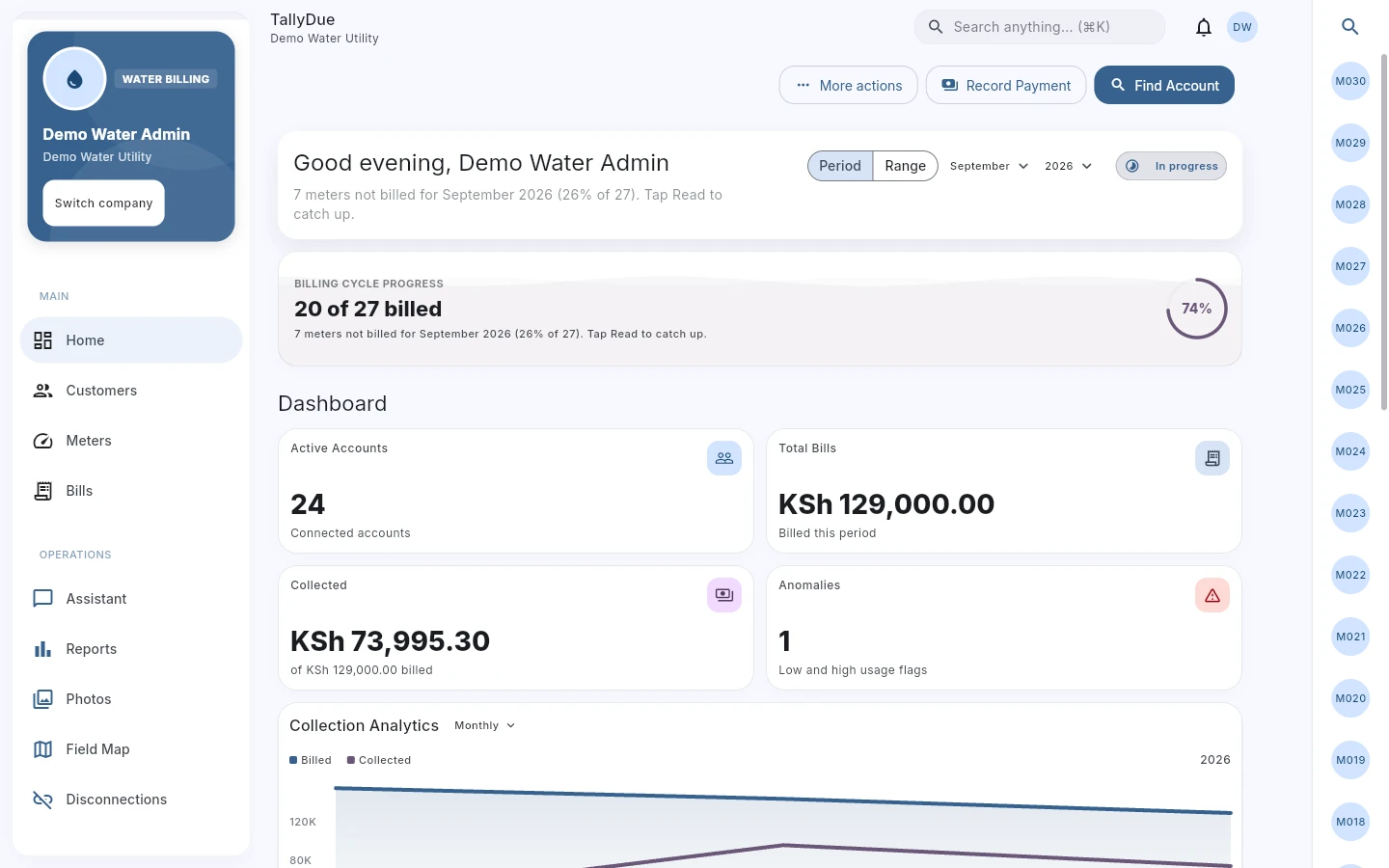
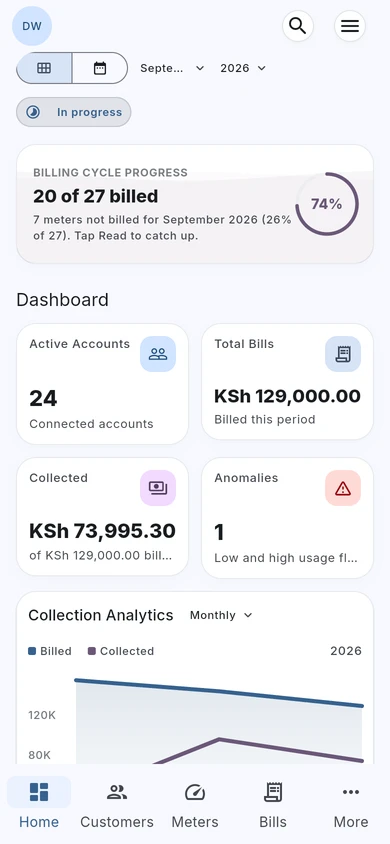
Water billing, with the full picture.
Review billing progress, amounts billed, collections, and consumption alerts from the water dashboard.
Actual TallyDue web app · Demo data
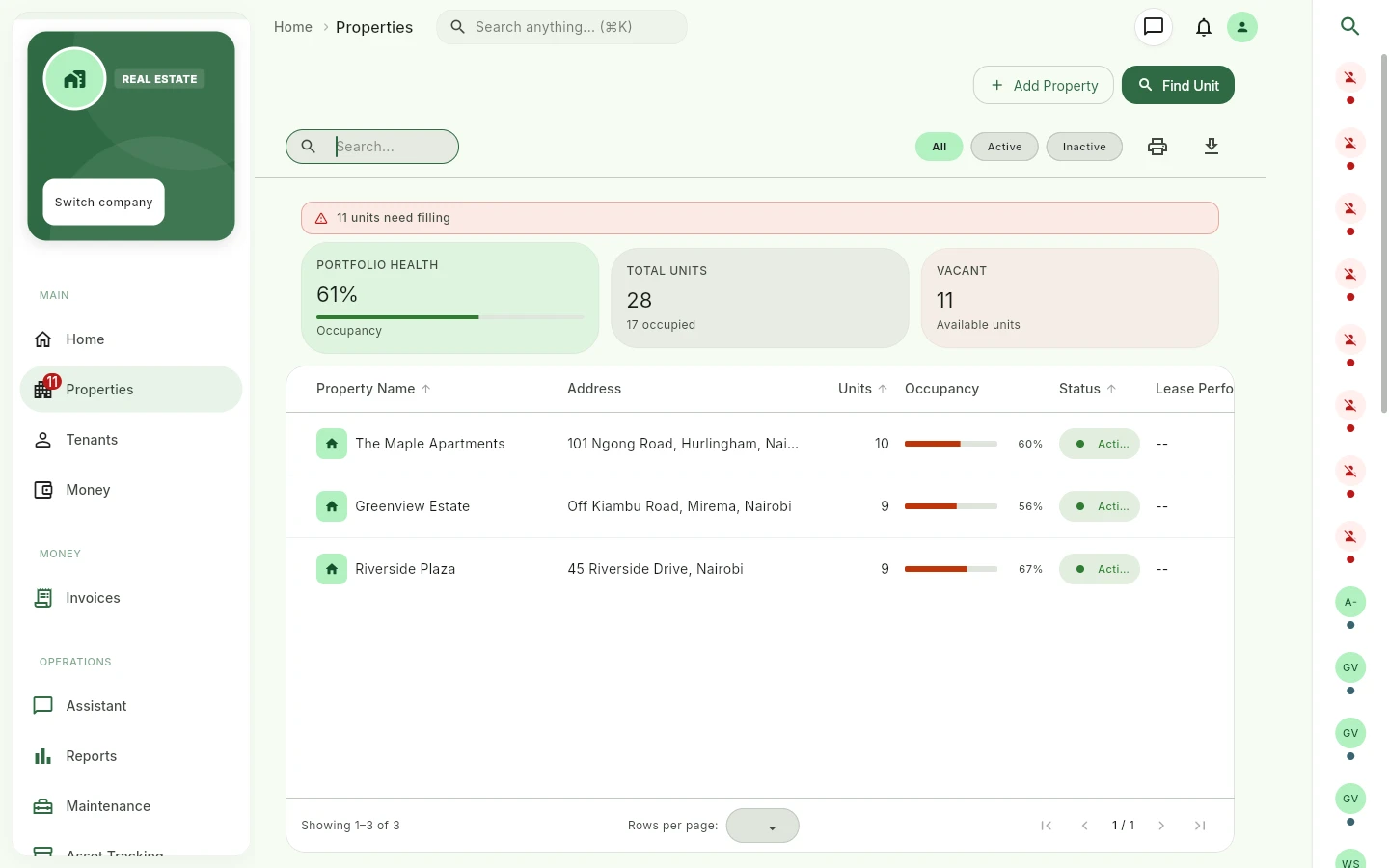
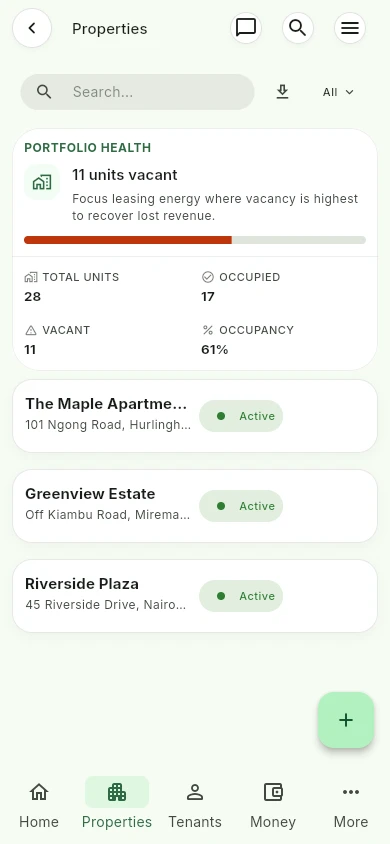
See every property in one view.
Review properties, occupied and vacant units, and portfolio occupancy before following up with your team.
Actual TallyDue web app · Demo data
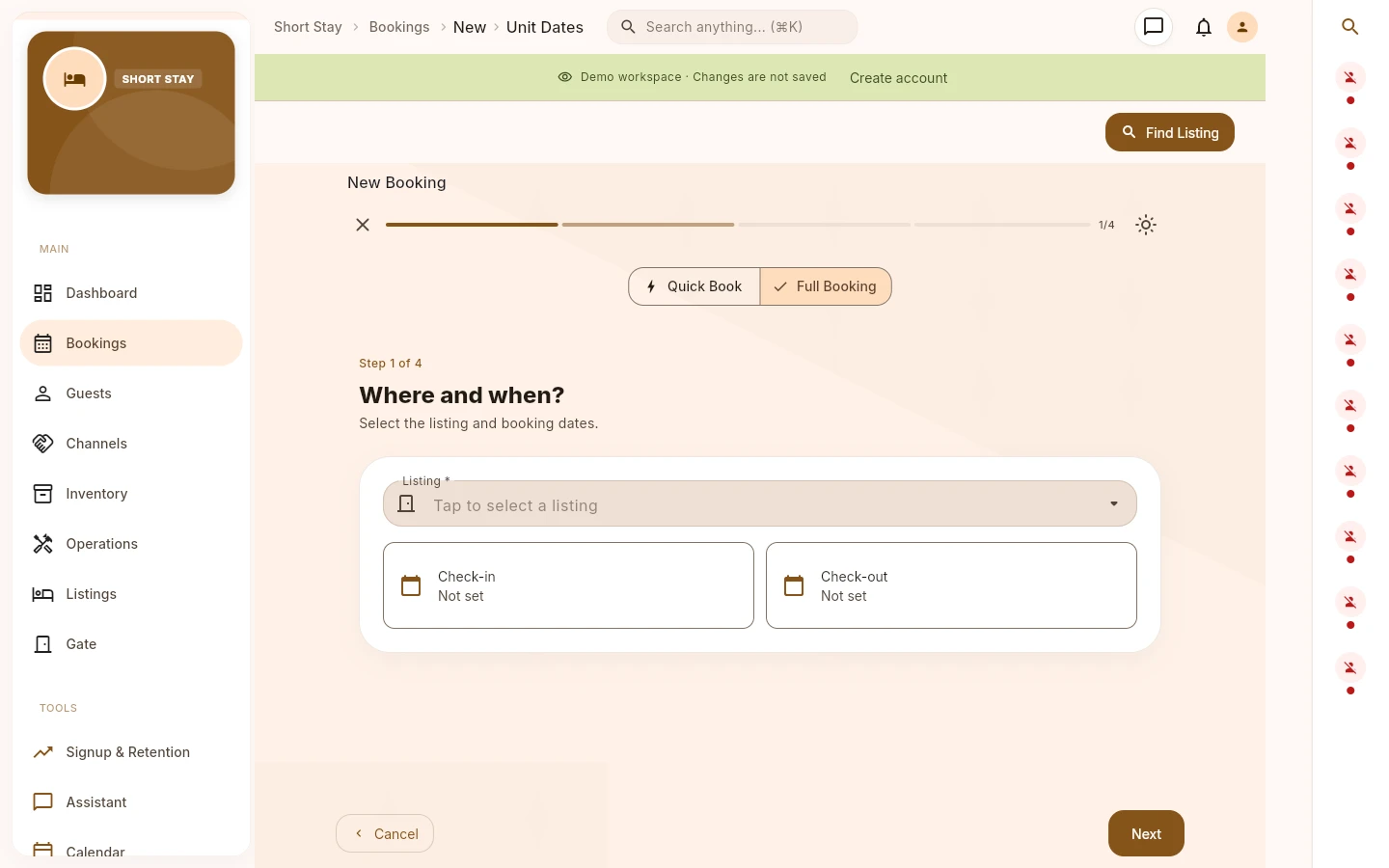
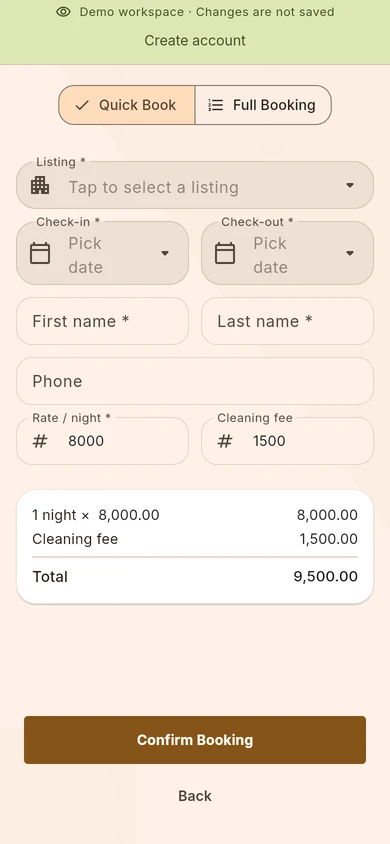
Give every booking a clear start.
Choose a listing and check-in and check-out dates in a guided booking flow, with quick and full booking options.
Actual TallyDue web app · Demo data
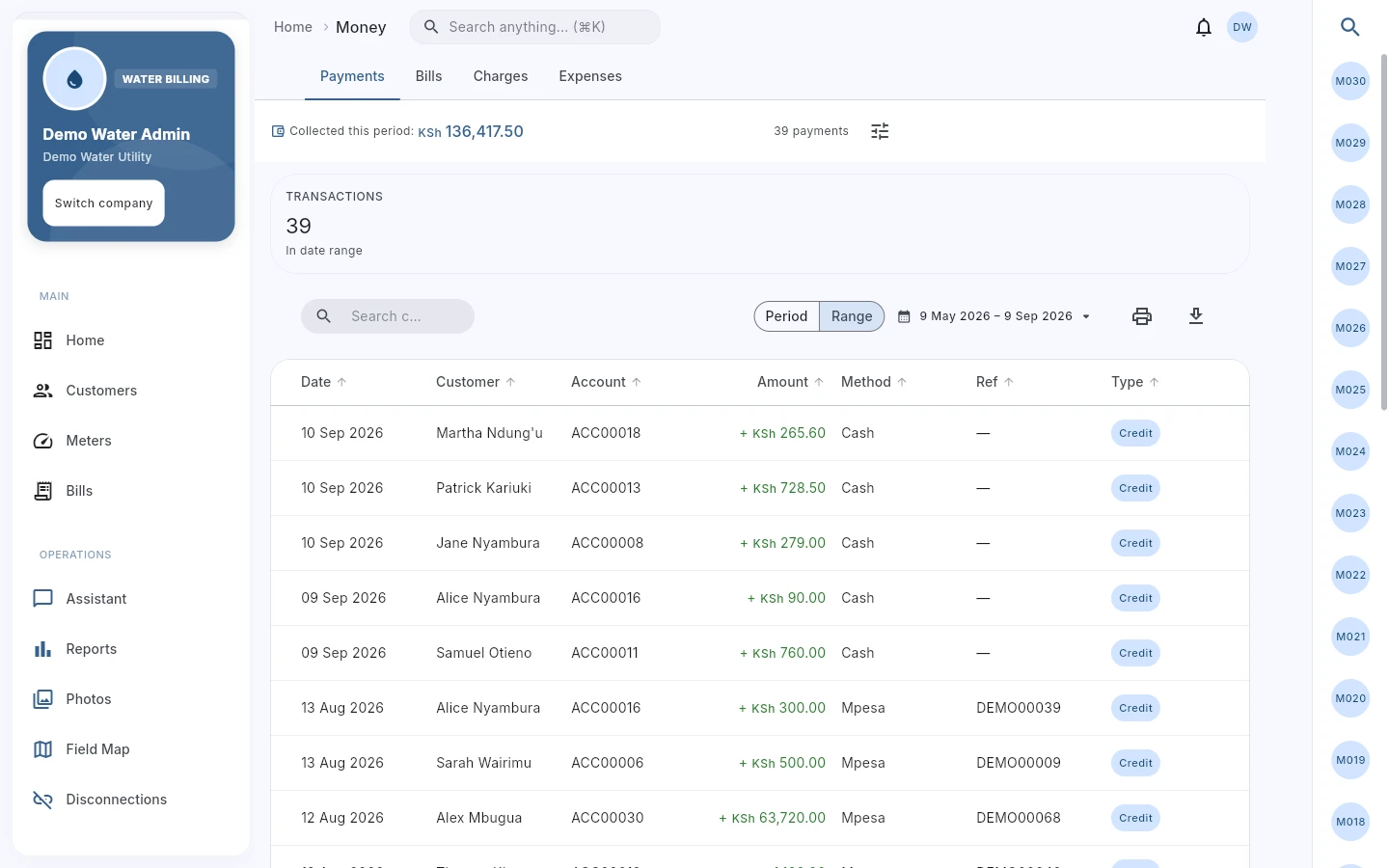
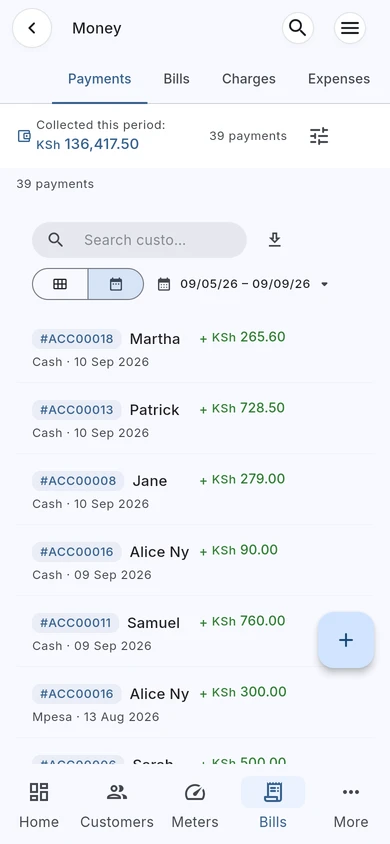
Follow the payment back to the account.
Review payment records and references in Money, with customer and billing context close at hand.
Actual TallyDue web app · Demo data
Take a look around.
Try the selected workspace with demo records. The full app opens in a new tab.
Cloud availability paired with offline local storage for field continuity.
Photo audit trails, GPS verification, and instant automatic sync.
Instant reference matching across mobile money and bank transfer rails.
iPhone, iPad, Android & Web all sharing one operational ledger.
 M-Pesa (Daraja)

From paperwork to TallyDue.
Move from paper slips and scattered spreadsheets to connected readings, bills, tenants, and payments. One workspace your whole team can open.

Three leaks drain the month. Each one gets its own page in the book: who read it, who billed it, who paid it.
-
01
Readings without proof
Customer, meter, photo, and location — or it did not happen. -
02
Bills nobody can find
Searchable records, date filters, receipts, live balances. -
03
Tenants and bookings adrift
The same book holds leases, guests, and staff history.
Meter to money in three stops.
-
1
Read it
The reader opens the meter card on the map, captures the reading, attaches the photo.
-
2
Bill it
The office reviews the route, opens Water Bills, issues the bill from the dashboard.
-
3
Bank it
Money lands by M-Pesa, the receipt is filed, the balance moves. Same app, same book.
The work, all connected.
Choose a workflow to explore in the full app. Each demo opens in a new tab.
 Field page
The route walks the reader.
Map, meter card, reading, photo. Proof attached at the tap.
- Route map and meter card
- Field location support
- Poor-connectivity workflow checks
- Photo evidence capture
 Billing page
Bills the office can defend.
Search, filter by date, open the bill, act. No spreadsheet.
- Water Bills list
- Date and status filters
- Bill document actions
- Unread meter review
 Money page
Every shilling leaves a receipt.
M-Pesa, manual payments, credits, balances — audited in Money.
- Payments tab
- Record Payment form
- Receipt and reference review
- Credits, bills, charges, and expenses
 Watchtower page
Catch the leak before month-end.
Anomalies, arrears, disconnections, the revenue dashboard.
- Consumption anomaly alerts
- Aging and arrears reports
- Disconnection workflows
- Executive revenue dashboard
 Estate page
Units, tenants, leases. Filed.
Properties, charges, invoices, arrears — the real-estate book.
- Property and unit management
- Billing setups and invoices
- Tenant tracking and history
- Lease management and renewals
 BnB page
Beds filled, tasks closed.
Bookings, calendar, guests, readiness — beside rent and water.
- Booking and calendar management
- Guest records and channels
- Unit readiness and supplies
- Operations tasks and audits
Trusted across rentals and water routes.
Real operational feedback from property managers, landlords, and water scheme teams using TallyDue.
“Attaching photo proof directly at the tap ended customer billing disputes. We run meter walks 100% offline in the hills, and everything reconciles when our readers return to the office.”
“We manage 64 apartment units across three estates. Reconciling bank slips and M-Pesa statements used to take our office team 4 days every month. Now payments match in real-time and send automated SMS receipts.”
“Having water submetering and rent in the exact same workspace is the real differentiator. Tenants receive one clear bill breakdown and pay via their unit paybill account reference.”
“We manage short-stay units alongside long-term tenant apartments. Having booking calendars, guest records, and turnover cleaning tasks in one app cut our admin overhead by half.”
Built for your team's exact role.
Whether managing 5 meters or 5,000 units across multiple regions, TallyDue connects the field to finance.
Direct Owner Portfolios
Collect rent automatically via mobile money, track tenant deposits, automate utility submetering, and eliminate late payment excuses.
- Direct mobile money & bank payouts
- Automated SMS rent reminders & receipts
- Tenant ledger and payment history
Multi-Unit Management
Oversee residential estates and commercial buildings. Handle lease agreements, service charges, maintenance tasks, and owner remittances.
- Unit-level occupancy & vacancy tracking
- Itemized service charges & invoices
- Landlord disbursement statements
Community & Private Utilities
Digitize meter walk routes, calculate stepped consumption tariffs, issue digital bills, and monitor non-revenue water.
- Tiered block-tariff billing calculations
- Offline meter reading with photo evidence
- Disconnection & reconnection workorders
Hospitality Operators
Coordinate reservations, guest check-ins, cleaning readiness, and channel revenue right alongside long-term tenant units.
- Multi-channel booking calendar
- Cleaning readiness & turnover tasks
- Nightly rate and guest ledger tracking
Operations in the Field
Empower field agents with map-guided routes, offline photo readings, tap status notes, and zero paperwork on iOS and Android.
- GPS tap mapping & route sequences
- Instant offline local database caching
- Fast camera capture and anomaly checks
Calculators & templates you can use today.
No sign-up required. Free interactive calculators and printable operational templates built for landlords, estate managers, and water operators.
Water Tariff & Submetering Calculator
Calculate tiered block consumption tariffs, standing meter rent, sewerage surcharges, and split master meter bills fairly across tenant submeters.
- Customizable tiered block rates (0-6, 7-20, 21-50 m³)
- Apartment master-to-submeter split allocator
- Instant print & PDF calculation summary
Prorated Rent & Move-In Calculator
Calculate exact daily rent for mid-month move-ins, security deposits, and move-in invoice breakdowns without spreadsheet arithmetic errors.
- Calendar day prorated rent calculations
- Security & utility deposit tracking
- Multi-currency display (KES, UGX, TZS, USD)
Landlord & Utility Forms Library
Free copy-and-print templates: Tenancy Agreements with utility clauses, meter walk route sheets, move-in checklists, and arrears demand letters.
- Residential Tenancy Agreement contract
- Water Meter Reading Field Walk Sheet
- Move-In / Move-Out Inspection Checklist
One book. Every entry searchable.
Company, customers, meters, readings, bills, payments — each action tied to the account it belongs to.
Move in three stops.
Start with daily records, verify them in TallyDue, roll each workflow live when the data is clean.
Prepare records
Clean customer, meter, property, unit, staff, and payment records before import or entry.
Verify workflows
Use the dashboard and help guides to test readings, bills, payments, tenants, and bookings.
Go live deliberately
Invite staff, confirm permissions, and switch teams over once the key records are reviewed.
Charges, posted.
Live from the commercial catalog. Pick a workspace, pick a period.
Prices and allowances are loaded from the current TallyDue commercial catalogs.
Asked at the gate.
TallyDue is free forever for up to 5 meters or units with no credit card required. As your portfolio grows, commercial tiers scale predictably based on active units, meters, and enabled workspaces.
Yes. Teams frequently run TallyDue in parallel with existing spreadsheets or legacy billing software during initial pilot routes to verify meter readings, bill calculations, and payment matching before full cutover.
TallyDue integrates directly with Safaricom M-Pesa (Daraja C2B/B2C) in Kenya, MTN Mobile Money and Airtel Money across East Africa, bank transfers, debit/credit cards via international gateways, and cash/cheque with manual reconciliation receipts.
Our native iOS and Android apps store the entire walking route and meter cards locally on device. Field readers can capture numeric dials, attach camera audit photos, and log GPS coordinates completely offline. All readings automatically sync once back in cellular or Wi-Fi coverage.
Yes. You can assign submeters to individual units or tenants under a master bulk meter. TallyDue calculates consumption using custom tiered tariffs or fixed rates, and can bundle utility charges directly onto the monthly rent invoice or issue separate water bills.
When a tenant pays via mobile money or bank rail, the system automatically matches the account number, posts the credit, and triggers an automated SMS receipt via Africa's Talking or email confirmation with updated balance details.
Yes. Companies can configure their operating currency in Kenyan Shillings (KES), Uganda Shillings (UGX), Tanzanian Shillings (TZS), Nigerian Naira (NGN), or US Dollars (USD). Tariffs, rent charges, and financial statements automatically format in your chosen primary currency.
Setup typically takes under 30 minutes. You can import customers, properties, units, and meter serial numbers via standard CSV/Excel templates. Our guided onboarding wizard walks you through setting up billing tariffs and staff roles.
All data in transit is encrypted using TLS 1.3, and data at rest is protected with AES-256 encryption. Role-based access control ensures field staff only see their assigned routes, while company administrators maintain complete governance over accounting and user permissions.
Bring your book. We keep it.
Open a demo, explore your workspace, and start free.