Notification Settings
TallyDue has two kinds of notifications. The inbox tells you what needs your attention. Notification settings control what your customers and tenants receive.
Your inbox
Section titled “Your inbox”Select the bell at the top of the screen to open Notifications. It has two tabs, Notifications (with the number unread) and Messages.
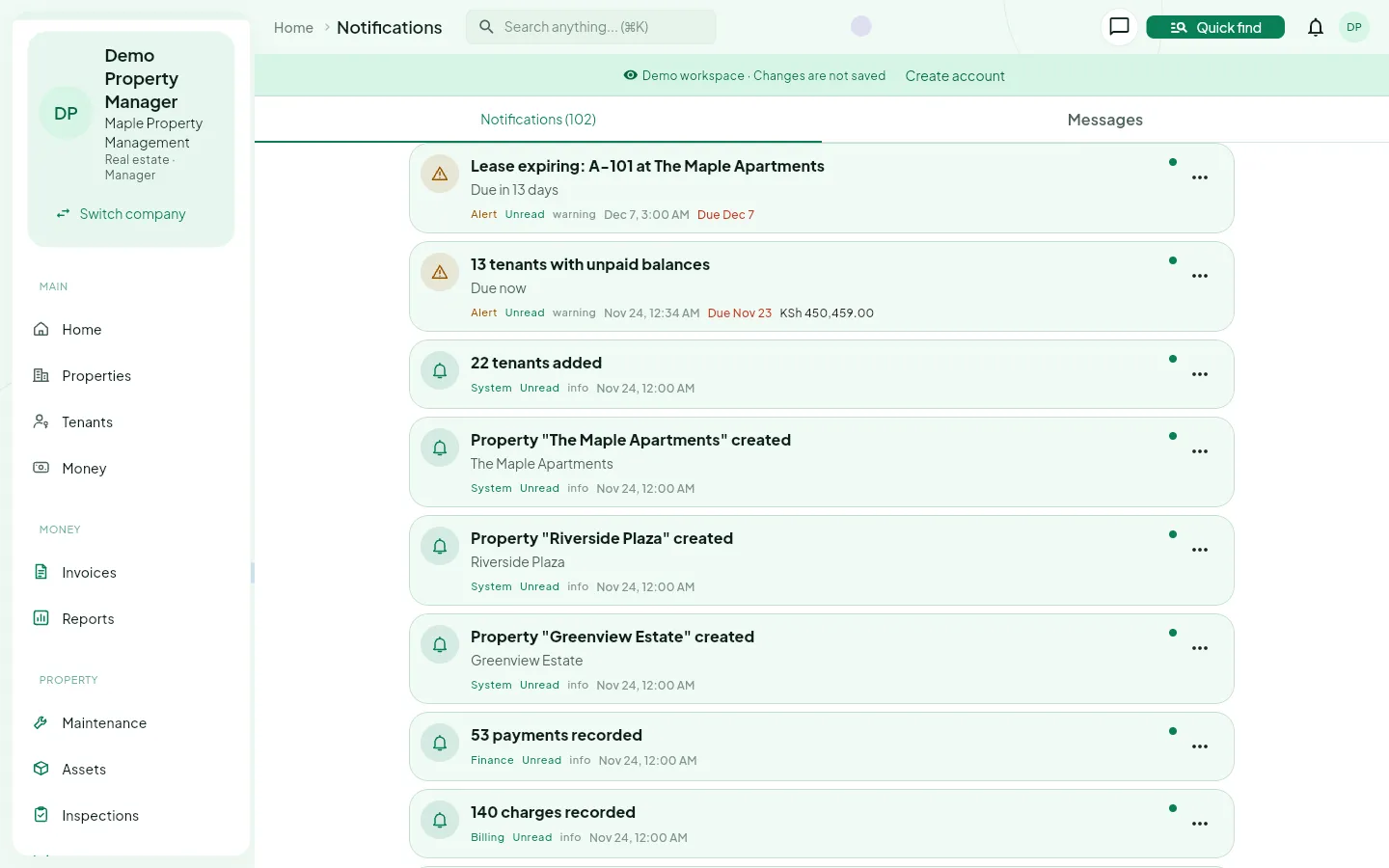
Each item shows its category, whether it is unread, its severity, the time, and a due date or amount when it has one. Examples are leases about to expire, tenants with unpaid balances, and meters not read this billing cycle.
- Select an item to read its details.
- Use the ⋯ menu on an item for Mark read or Archive.
- Select Mark all as read to clear the unread count.
- On a large screen, the Inbox panel counts Unread, Needs attention, Updates, and Archived items and lets you filter by them.
Messages holds announcements and updates from your team. When there are none, it reads “No messages yet”.
Choose how customers are notified
Section titled “Choose how customers are notified”- Open Settings, then Notifications.
- Switch each channel on or off:
- WhatsApp: send bills and reminders via WhatsApp.
- SMS: send bills and reminders via SMS.
- Email: send bills and reminders via email.
- Wait for each change to save before the next one. If the section shows a load error, refresh and try again.
Property & Rent
Section titled “Property & Rent”- Open Settings, then Notifications.
- Switch on the events your tenants should hear about: Rent reminders, Lease expiry, Lease terminated, Payment confirmations, and Maintenance updates.
- Under Preferred channel, choose SMS, EMAIL, or WHATSAPP. This is the fallback when a tenant has no preferred channel on their own record. Per-contact leaves the choice to each tenant’s record.
Each change saves straight away.
Check SMS balance (water)
Section titled “Check SMS balance (water)”SMS messages draw on your SMS balance. Open Settings → SMS Balance to see the balance and an estimate of the messages left, and to set the Warning threshold and Critical threshold. When the balance is low, an SMS low or SMS empty label shows on your Home screen. See Company Settings.
Before you rely on a notification
Section titled “Before you rely on a notification”- Check the customer or tenant has the right phone number or email on their record.
- Check the channel is switched on here.
- For SMS, check the balance is not empty.
- Check the related bill, payment, or lease to see that the message went out. For a full list of what was sent and whether it was delivered, see the logs in Messaging.